 Nostreon
Derek Ross
September 27, 2026
Carnelian: Publish to Nostr Straight from Omawrite
I write in Omawrite now. Carnelian adds a Publish to Nostr entry to the Omarchy Share menu that uploads my images to Blossom, signs the article through Opal, and sends it to my own relays. One key, one dialog, done.
Omarchy 4 shipped with Omawrite, DHH's writing app. It is a single window with a monospace font, a word count in the corner, and nothing else. It saves plain markdown files. I normally write my blog articles in my own Onyx app, but I wanted to try Omawrite and test integartions with it.
So I built Carnelian. It is one bash script and a menu entry, and it turns "publish this" into a keystroke.
What it does
With an article open in Omawrite, I press Super + Ctrl + S, the Omarchy Share menu. A new group called Publish to Nostr sits there, next to the sharing entries I already had. It only appears while Omawrite is the focused window, so it does not clutter the menu anywhere else.
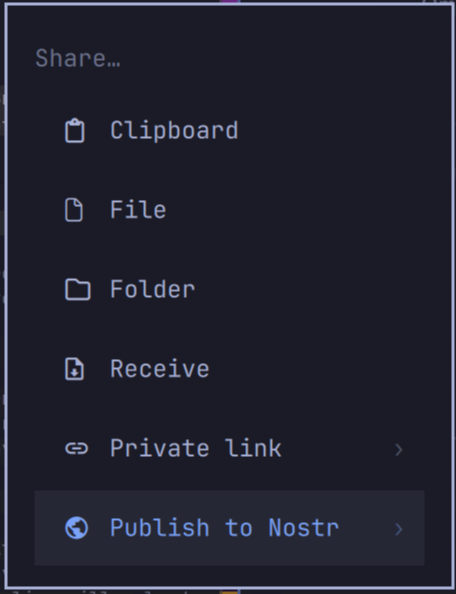
Pick Publish and a floating terminal opens with a preview: the title, the slug, the date, the summary, the hashtags, how many images will be uploaded and where, and the first twenty lines of the body. Type y to confirm. Opal, the Nostr signer in my Omarchy bar, pops its approval dialog showing exactly what is about to be signed. Approve it, and the article is on my relays.
Pick Dry run instead and you get the same preview plus the full event as JSON, signed with a throwaway key, sent nowhere. Feel free to test it.
Nothing about me is hard-coded
This was the design rule. Carnelian is a tool I wrote for myself, but it works for anyone with a Nostr key, because everything it needs comes from that key.
- It fetches your NIP-65 relay list and publishes to your write relays.
- It fetches your Blossom server list and uploads images there.
- Both lists are cached and refreshed once a day, or on demand with
carnelian refresh. - A config file overrides either one, and command-line flags override the config.
carnelian status shows which source each list came from, so there is never any mystery about where an article is going.
Images
Omawrite is a plain-text editor. An image is a line of markdown pointing at a file on disk:

Paths are relative to the article, and absolute paths work too, which matters because Omarchy screenshots land in Pictures. Before publishing, Carnelian hashes each local image, uploads it to the first Blossom server, mirrors it to the rest, and swaps the link for the blob URL in the published body. Remote links are left alone.
Uploads are content addressed, so republishing after an edit never uploads an unchanged image twice. The markdown file on disk is not touched unless you ask for it with a flag, because Omawrite is watching that file and would rather not be surprised.
Signing
Carnelian never sees my key. carnelian setup asks Opal for a bunker link over NIP-46, pairs with a client key made just for Carnelian, and from then on Carnelian appears in Opal's app list like any other app. I set its policy to ask, so every article signature and every Blossom authorization shows up as a dialog with the content in it. For a post with several images I tick "remember for an hour" on the first one.
If you do not run Opal, the script takes any key nak accepts, or prompts for one.
Under the hood
There is no Omawrite plugin system, and no Omarchy plugin can reach inside another app. What Omarchy does have is a Share menu defined in a JSONC file that accepts a shell condition per entry. Carnelian's entry checks whether the focused window is Omawrite. That is the whole integration.
Finding the open document took one detour. Omawrite writes a recovery file while a document has unsaved changes and deletes it on save, so the first version broke the moment I hit Ctrl + S. The window title carries the filename, with an asterisk in front when modified, and Omawrite remembers the last directory it saved into. Those two facts are enough.
The signing and publishing is nak, fiatjaf's Nostr army knife.
Install
git clone https://github.com/derekross/carnelian ~/Projects/carnelian
~/Projects/carnelian/dist/install.sh
carnelian setup
You need Omarchy 4 with Omawrite, nak (omarchy pkg aur add nak-bin), and Opal if you want the signing to be this painless. The installer links the command into your path and adds the Share menu entries. Setup pairs with Opal and fetches your lists.
Carnelian is named for the stone of signet rings, which sealed letters for a few thousand years before Nostr. It sits beside Opal and Peridot in my bar. MIT licensed, one file, and this article was published with it.